
Issue Description
The bullseye on your GRANBOARD is not registering scores when hit.
Possible Cause
The bullseye segment may be incorrectly positioned inside your GRANBOARD.
Solution
Adjust the segment to the correct position
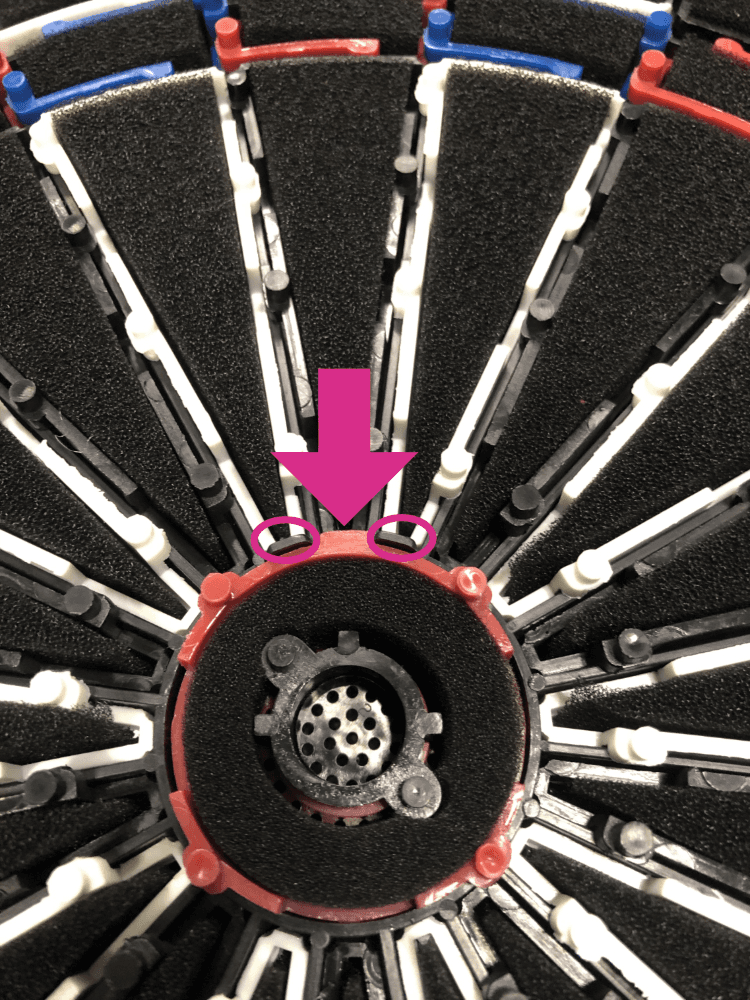
If the protrusion is not facing number 20, the segment will rotate and score will not register correctly. Please adjust the position of the segment.
Open your GRANBOARD
Please open the backboard and check if the bullseye segment is installed properly.
Check if it is installed correctly
Look for the small protrusion on the bullseye segment.
This protrusion prevents the segment from rotating and must face towards the number 20 for correct positioning.
Adjust the Segment
If the protrusion is not facing number 20, the segment will rotate and score will not register correctly.
Adjust the bullseye segment so the protrusion faces number 20.
Visual Reference
Watch this video for step-by-step instructions: https://youtu.be/YbVPdiwVfMY
See the image below for the correct bullseye position.