
Issue Description

GRANBOARD couldn't connect to the app, even after turning on the board and launching the application.


Solution

After launching the GRANBOARD app, the app will normally connect to your GRANBOARD automatically via Bluetooth.


If the connection does not happen automatically, please follow these steps to connect manually:

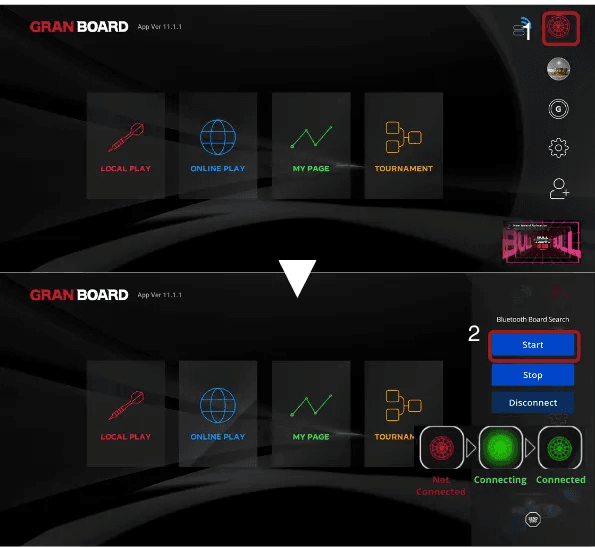
  1. Tap the dartboard icon in the top right corner of the app

  2. Tap Start and the app will begin searching for your GRANBOARD

  3. Wait until the board icon turns green


Once the dartboard icon turns green, your GRANBOARD is successfully connected to the app and you can start playing!

Be first for giveaways, prizes, app updates and offers.

By subscribing, you agree to receive marketing emails from GRAN DARTS. Unsubscribe anytime. See our Privacy Policy.

Dealer Portal

For authorized GRAN dealers.

© 2026 GRAN DARTS. All rights reserved.

Be first for giveaways, prizes, app updates and offers.

By subscribing, you agree to receive marketing emails from GRAN DARTS. Unsubscribe anytime. See our Privacy Policy.

Dealer Portal

For authorized GRAN dealers.

© 2026 GRAN DARTS. All rights reserved.

Be first for giveaways, prizes, app updates and offers.

By subscribing, you agree to receive marketing emails from GRAN DARTS. Unsubscribe anytime. See our Privacy Policy.

Dealer Portal

For authorized GRAN dealers.

© 2026 GRAN DARTS. All rights reserved.