

GranOnline

Search…

⌘

K

GranOnline

Search…

⌘

K

GranOnline

Search…

⌘

K

Organiser un tournoi

Set a Password for a Tournament


Overview

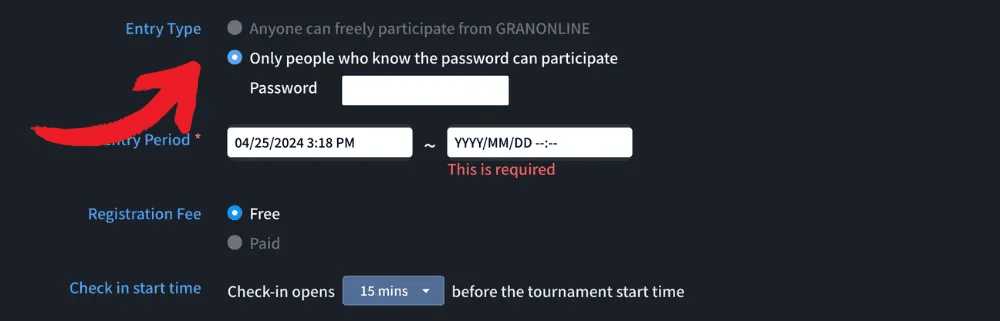
If you want to create a private tournament for family or friends, you can set up a password during tournament creation. Only users with the correct password will be able to join.

Steps

On the tournament creation page, scroll down to the "Other Settings" section.

  1. Select "Private - Participants with password only"

  2. Create a password for your tournament

  3. Click "Save and Publish"

Your private tournament is now ready!
Tips

Share both the password and the tournament link with the participants you want to invite. This will make it easy for them to join your tournament.


Sur cette page

Soyez les premiers informés des concours, lots, mises à jour et offres.

En vous inscrivant, vous acceptez de recevoir des e-mails marketing de GRAN DARTS. Désinscription possible à tout moment. Voir notre Politique de confidentialité.

Espace revendeurs

Commandes, prévisions et téléchargements.

© 2026 GRAN DARTS. Tous droits réservés.

Soyez les premiers informés des concours, lots, mises à jour et offres.

En vous inscrivant, vous acceptez de recevoir des e-mails marketing de GRAN DARTS. Désinscription possible à tout moment. Voir notre Politique de confidentialité.

Espace revendeurs

Commandes, prévisions et téléchargements.

© 2026 GRAN DARTS. Tous droits réservés.

Soyez les premiers informés des concours, lots, mises à jour et offres.

En vous inscrivant, vous acceptez de recevoir des e-mails marketing de GRAN DARTS. Désinscription possible à tout moment. Voir notre Politique de confidentialité.

Espace revendeurs

Commandes, prévisions et téléchargements.

© 2026 GRAN DARTS. Tous droits réservés.