



GranDarts アプリ
友達や家族と一緒に遊ぼう
概要
家族や友人と一緒にプレイする際、ゲストプレイヤーしか使用できないと、誰が投げているのか分かりにくくなります。
また、家族や友人も自分専用の名前やアイコンを使用してプレイし、個人の成績(スコア)を記録したいと考えています。
解決策
「ゲストエントリー」機能を使用してください。ゲストエントリー機能を使用すると、以下のことが可能になります。
ゲストが自分専用のプレイヤー名やアイコンを使用して参加できる
ゲーム結果(プレイデータ)が、それぞれの個人アカウントに保存される
これにより、複数人でのマルチプレイがより快適になります。
ゲストエントリーについて
この機能は、Gran Dartsアプリにログインしているプレイヤー(ホスト)が、他のプレイヤー(ゲスト)のアカウントに一時的にログインすることで、同じアプリ内でそれぞれのプレイヤーデータを使用して一緒にプレイできるようにする機能です。
この機能を使用すれば、個別のアカウント(別端末)で管理している家族や友人を簡単にゲームに招待できます。
使用するアプリとその役割
役割 | 説明 |
|---|---|
ホスト | メインのプレイヤーです。ボードに接続し、ゲストを招待します。 |
ゲスト | ホストのアプリに一時的に参加するプレイヤーです。自分自身のプレイヤーデータを使用します。 |
ゲストエントリーの手順
【ホスト側の操作】
1. Gran Dartsアプリを起動し、「ローカルゲーム」を選択します。
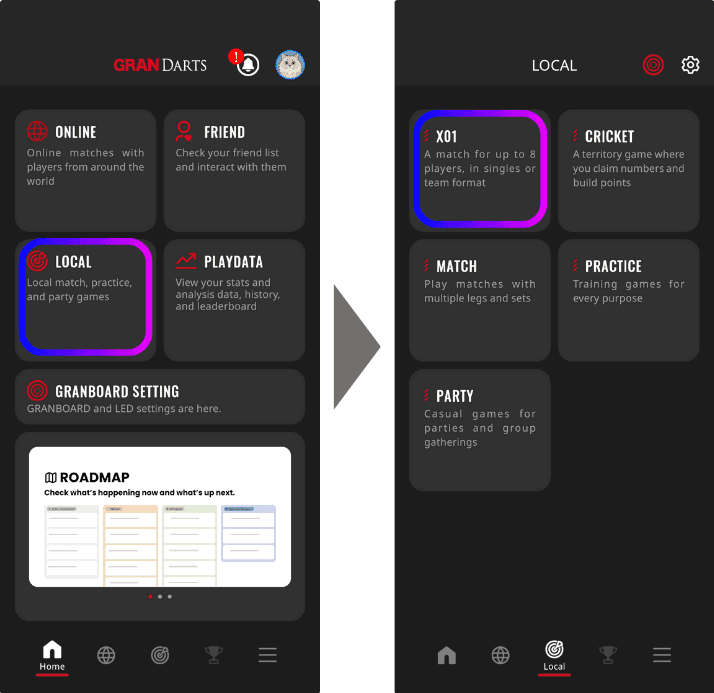
2. ゲストプレイヤーの下にある「+」アイコンをタップし、「ゲストエントリーQRコード」を表示します。
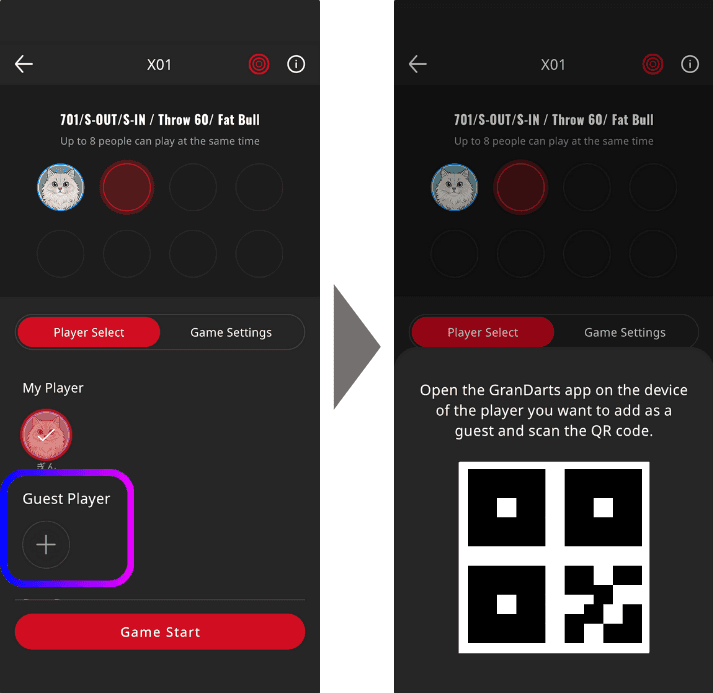
これでホスト側の準備は完了です。
→ ゲストは、このQRコードを読み取ることでエントリーを完了できます。
【ゲスト側の操作】
1. ご自身のスマートフォンにGran Dartsアプリをインストールします。
「新規アカウント登録」または「ログイン」を行います。
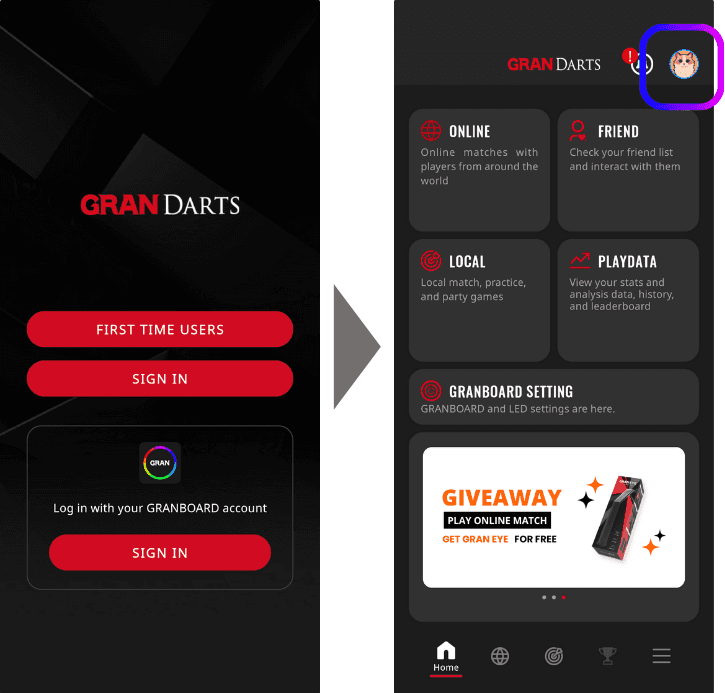
画面右上にあるアイコンをタップします。
2. QRコードスキャナーを起動し、ホストのQRコードを読み取ります。
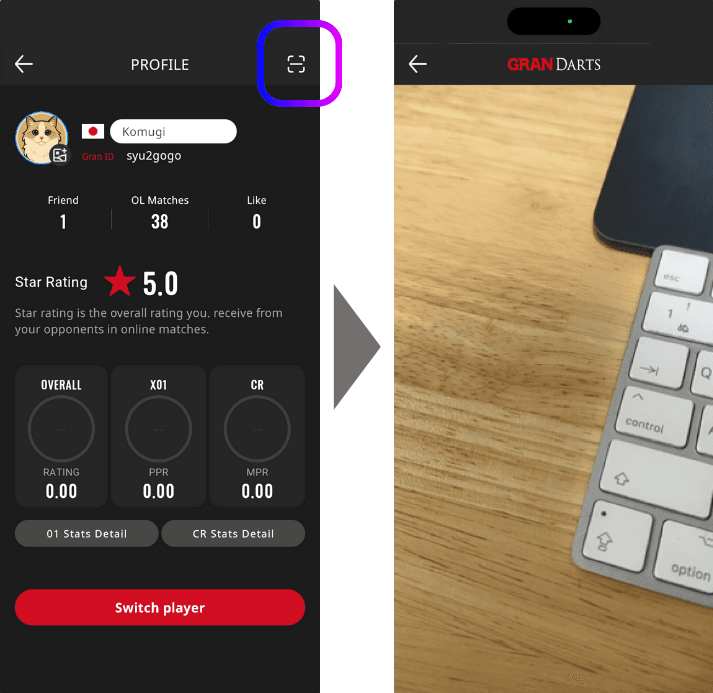
3. ホストのQRコードをスキャンします
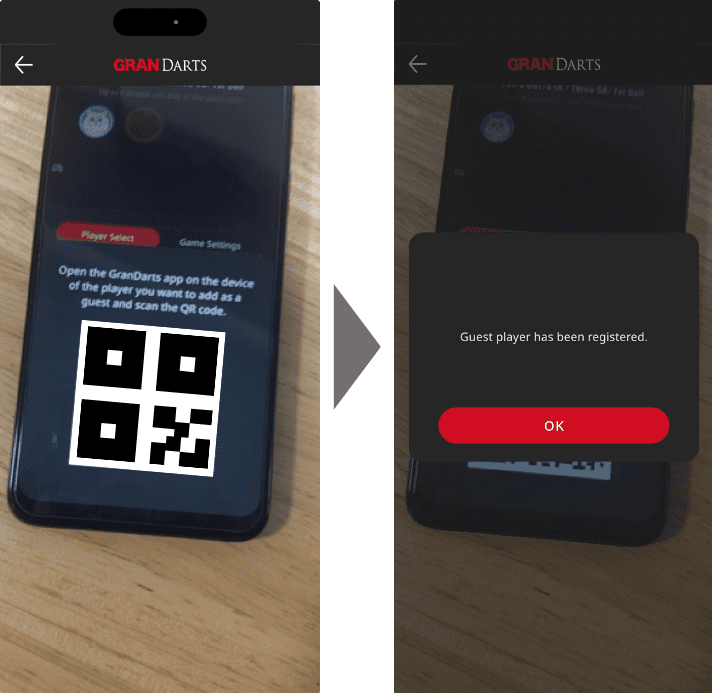
プレイ後のデータについて
ゲストエントリーを利用して一緒にプレイした場合、各プレイヤーのスコアやプレイデータはそれぞれのアカウントに保存されます。
ホスト → Gran Dartsアプリ内の自身の本人アカウントに記録されます
ゲスト → Gran Dartsアプリ内の自身の本人アカウントに記録されます
そのため、別々の端末で管理されているアカウント同士であっても、スコアは正確に各アカウントへ保存されます。
注意事項
ゲストエントリーの解除は、ホストの端末で行う必要があります。プレイ終了後は、ゲストの解除を忘れないように注意してください。
よくある質問
Q. ゲストは何人まで追加できますか? → ゲストリスト(リスト)に追加できるゲストは最大8人までです。
Q. ゲストがログインしていない場合はどうなりますか? → ログインしていない場合でも、ホストの端末でプレイヤーとしてプレイすることができます。