What is an SSID?
What is an SSID?
An SSID is the “network name” that appears when you connect to Wi-Fi on a smartphone or computer.
How to check your SSID
You can check your SSID from your router or smartphone.
Check from your router
The SSID is listed on the label on your router. The item labeled “SSID” or “Network Name” is your network name.
If there are multiple options, choose the one labeled “2.4GHz”.
Check from your smartphone
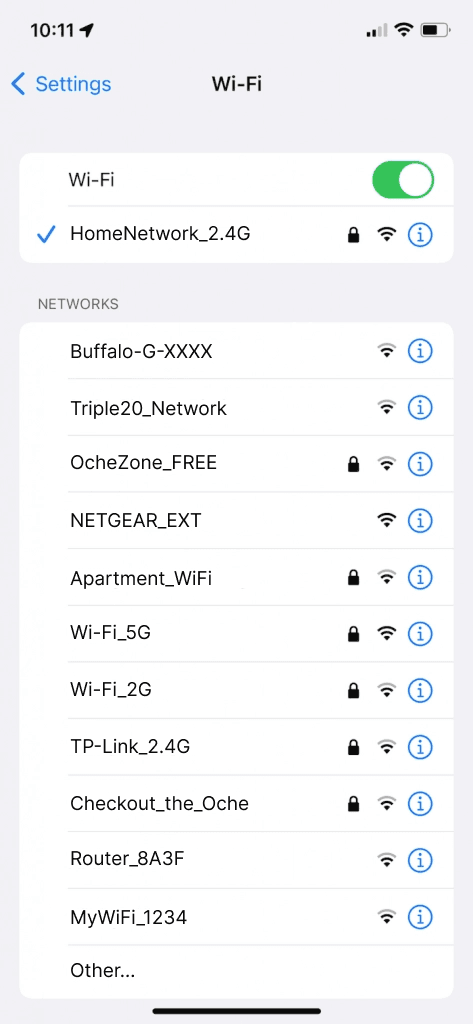
On a device connected to Wi-Fi, you can check the current SSID using the steps below.
iOS device
Settings > Wi-Fi > The name of the connected network is your SSID.
Android device
Settings > Network & internet > Wi-Fi > The name of the connected network is your SSID.
⚠️ GRAN EYE supports only 2.4GHz Wi-Fi.
Please note that you cannot use SSIDs displayed as “5GHz” or “5G”.
What is an SSID?
An SSID is the “network name” that appears when you connect to Wi-Fi on a smartphone or computer.
How to check your SSID
You can check your SSID from your router or smartphone.
Check from your router
The SSID is listed on the label on your router. The item labeled “SSID” or “Network Name” is your network name.
If there are multiple options, choose the one labeled “2.4GHz”.
Check from your smartphone
On a device connected to Wi-Fi, you can check the current SSID using the steps below.
iOS device
Settings > Wi-Fi > The name of the connected network is your SSID.
Android device
Settings > Network & internet > Wi-Fi > The name of the connected network is your SSID.
⚠️ GRAN EYE supports only 2.4GHz Wi-Fi.
Please note that you cannot use SSIDs displayed as “5GHz” or “5G”.