How to Recover a GRAN EYE Camera Using a microSD Card
How to Recover a GRAN EYE Camera Using a microSD Card
About This Procedure
This procedure explains how to restore the GRAN EYE camera system using the recovery microSD card provided by GRAN DARTS Support.
You will need to remove the camera cover during this procedure.
Please read through all of the steps below before starting the recovery process.
What You Will Need
Recovery microSD card provided by GRAN DARTS Support
GRAN EYE camera to be restored
Screwdriver for removing the camera screws
USB cable for powering the camera
USB power adapter
Recovery Procedure
1. Remove the camera from the MagMount
Remove the camera to be restored from the MagMount.
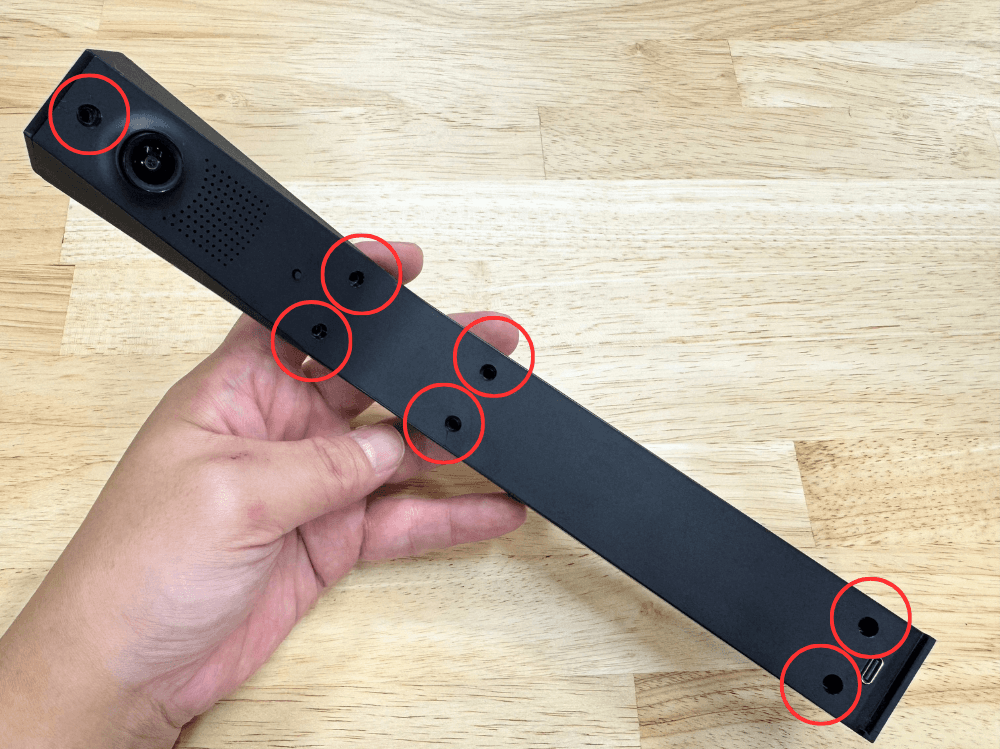
2. Remove the camera screws
Remove the screws from the camera and take off the cover.

3. Insert the microSD card
Once the PCB (circuit board) is exposed, insert the recovery microSD card provided by GRAN DARTS Support into the microSD card slot.

4. Connect the USB cable while holding down the reset button
While pressing and holding the camera's reset button, connect the USB cable to the camera to power it on.


5. Release the reset button when the indicator light turns solid red
When the camera's indicator light turns solid red (not flashing), release the reset button.
The recovery process will begin.

6. Wait approximately 2–3 minutes
Do not disconnect the USB cable or remove the microSD card while the recovery process is in progress.
7. Wait until the indicator light starts flashing red
When the camera's indicator light changes from solid red to flashing red, the recovery process is complete.
8. Disconnect the USB cable
Disconnect the USB cable from the camera to turn off the power.
9. Remove the microSD card
Remove the recovery microSD card from the camera.
10. Reassemble the camera
Reattach the camera cover and tighten the screws.
The camera recovery procedure is now complete.
Related Article